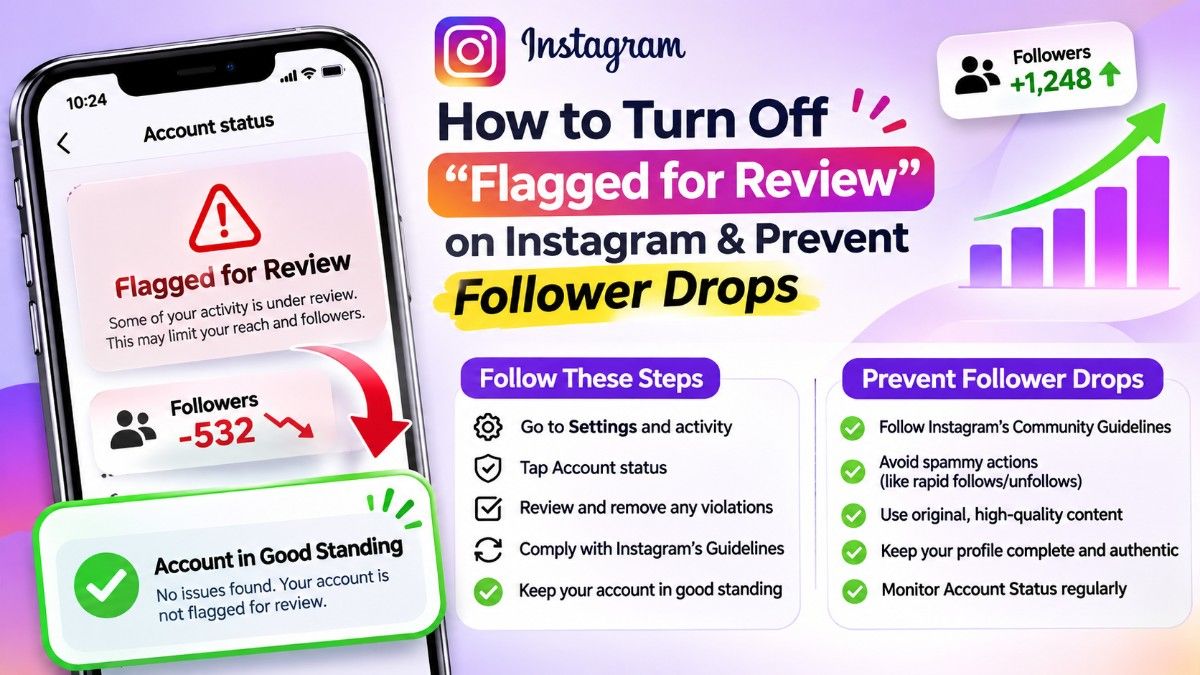
Technical Fix: Instagram’s "Flagged for Review" setting automatically quarantines incoming followers if spam filters detect rapid velocity or unverified profiles. Before ordering growth packages from the best SMM panel in India, creators must disable this toggle under Follow and Invite Friends to ensure instant, uninterrupted follower delivery.
Have you ever placed an order for 5,000 Instagram followers, watched the server status turn to "Completed," and then checked your profile only to see your public follower count has barely moved? Before assuming the server failed, check your Followers list inside the Instagram mobile app—you will likely see a hidden folder at the very top labeled "Flagged for review."
Introduced as an anti-spam moderation layer, Instagram’s "Flagged for Review" toggle is enabled by default on almost all Creator, Business, and personal profiles. When active, it intercepts incoming follow requests during high-velocity campaigns and holds them in a pending quarantine queue instead of adding them to your public counter. By disabling this single setting prior to using a specialized Instagram SMM panel, digital marketing agencies and influencers can eliminate delivery bottlenecks and protect their refill guarantees.
How Instagram’s "Flagged for Review" Quarantine Filter Works
Even when your Instagram profile is set to **Public**, the platform runs an automated heuristic check on every account that taps your Follow button. The system intercepts and quarantines incoming followers based on three primary triggers:
- Sudden Velocity Spikes: If a profile that normally gains 5 followers a day suddenly receives 1,000 follow actions within 15 minutes, Instagram’s rate-limiting filter diverts the incoming accounts into the Flagged queue for manual owner approval.
- Account Age & Device Telemetry: Newly registered accounts, profiles lacking profile pictures, or sessions originating from shared IP subnets are automatically categorized as "potential spam" if the review filter is active.
- Why Automated Servers Mark the Order "Completed": From the perspective of an automated fulfillment server, the follow request was successfully dispatched to your profile URL. If your account quarantines those followers behind the Flagged toggle, the server cannot detect the internal hold—and standard refill buttons will not trigger until the toggle is turned off.
Step-by-Step: How to Turn Off "Flagged for Review" on Instagram (2026 UI)
Follow this exact 4-step path inside the latest Instagram iOS or Android app before submitting any follower order:
- Open Settings and Activity: Go to your Instagram profile page and tap the three horizontal lines (☰) in the top-right corner.
- Navigate to Follow and Invite Friends: Scroll down past the "How others can interact with you" section and tap Follow and invite friends.
- Disable the "Flag for review" Toggle: Locate the switch labeled Flag for review at the bottom of the screen and toggle it OFF (grey).
- Confirm Public Account Status: Return one screen back to Account privacy and verify that Private account is also switched OFF.
Impact of the "Flag for Review" Setting on SMM Campaigns
Review how leaving this setting enabled versus disabled affects order delivery, public counter updates, and 365-day refill eligibility:
4 Best Practices to Prevent Instagram Follower Drops in 2026
Once your account's spam quarantine filter is disabled, apply these four operational standards to maximize long-term follower retention:
1. Choose Aged Account Servers with 365-Day Refill Guarantees
Low-grade bot panels use freshly generated accounts that get swept during Instagram’s weekly security purges. Always select **"Old Accounts"** or **"365 Days Refill"** servers from your wholesale dashboard. Aged profiles carry established browsing histories and profile photos, making them virtually immune to automated cleanup sweeps.
2. Never Change Your @Username While an Order Is Processing
Automated SMM servers track your order progress by polling your exact Instagram profile URL and initial follower start count. Changing your `@username` or switching your account to Private mid-order breaks the API webhook connection, causing the order to halt with no refund or refill eligibility.
3. Do Not Stack Multiple Follower Orders on the Same Link Simultaneously
If you place two separate orders of 2,000 followers for the exact same Instagram profile at the exact same time, both servers will record the same starting follower count (e.g., 1,000). Once the total count reaches 3,000, **both** servers will mark their orders as "Completed," resulting in only 2,000 delivered followers instead of 4,000. Always wait for your first order to finish before submitting the next batch.
4. Pair Follower Growth with Proportional Reels Views & Likes
An account that jumps from 800 followers to 25,000 followers while its latest Reels still sit at 150 views looks unnatural to both human visitors and algorithmic audit filters. Balance every follower milestone by boosting your recent 3 to 5 posts with proportional Reels views and Indian likes.
Checklist for Agency Onboarding: Before launching a retainer campaign for a new brand or influencer client, send them a 15-second screenshot guide instructing them to turn off Settings → Follow and invite friends → Flag for review. This single onboarding step eliminates 95% of support tickets regarding "missing" followers.
Frequently Asked Questions
What happens if I placed an Instagram follower order while "Flag for review" was turned ON?
Go to your Instagram profile, tap Followers, and click the Flagged for review category at the top of your list. Tap Approve all (or turn off the "Flag for review" toggle altogether), and all quarantined followers will immediately move into your public follower counter.
Does turning off "Flagged for review" put my Instagram account security at risk?
No. The "Flagged for review" setting only filters incoming public follower requests; it has zero connection to your login security, password protection, or Two-Factor Authentication (2FA). You can safely re-enable the toggle 24 hours after your growth campaign completes.
How do automated refill buttons work if some Instagram followers drop later?
When you order a package labeled with a 30-day, 60-day, or 365-day Refill guarantee (and keep your Flagged filter turned off), a 1-click "Refill" button is active in your order history. Clicking it triggers an automated server check that replenishes any dropped followers back to your target quantity free of charge.

About Kavesh Arora
Kavesh Arora is the Founder of All Media Promotion and an SMM Growth Architect with over 10 years of experience in Instagram algorithmic scaling, retention engineering, and wholesale API fulfillment.
Chat on Telegram →